
How you use it
- Turn it on once
Verify your clinic’s KYC, then the doctor in charge signs the platform terms by scanning a QR code.
- Create the form and send it
Pick admission or surgery consent, fill in the details, and send the link or show the QR code.
- Download the signed PDF
The patient signs on their phone. The form shows as signed and the PDF is ready.
What you get
- Admission and surgery consent, two ready forms with the patient, attendant, procedure and risk filled in by you
- A link or a QR code, the patient opens it on their own phone, reads it and signs
- Signature and photo, the signed form is sealed with the patient’s signature and photograph
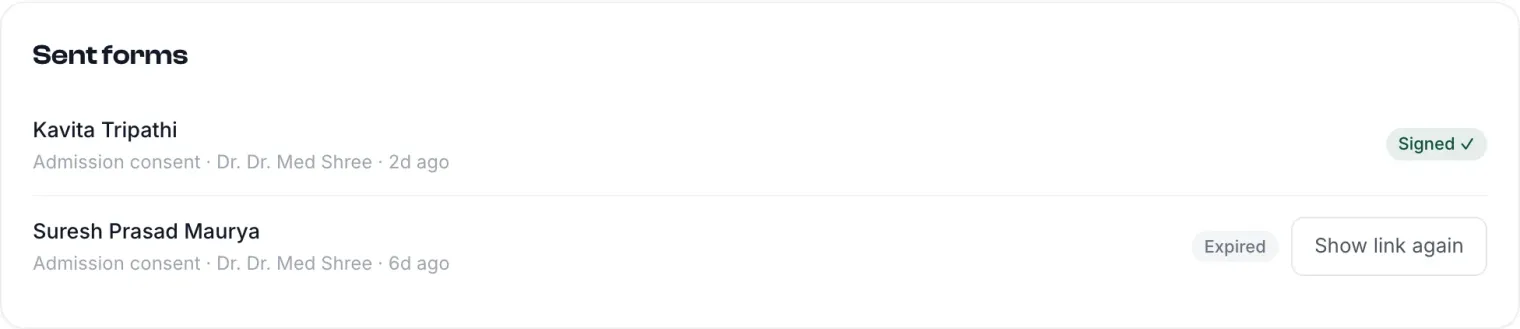
- A signed PDF, downloadable from the list of sent forms, with its status
Links do not live for ever. Each consent link works for 24 hours. If the patient misses it, send a new one from the list with one tap.
One-time setup
Digital consent opens once your clinic’s KYC is verified and the doctor in charge signs the platform terms, once, by scanning a QR code. After that, any doctor at the clinic can send forms.
Questions doctors actually ask
Which consent forms are available?
Admission consent and surgery consent. You fill in the doctor, the patient, the attendant and their relation, the procedure and the risk note, then send it.
How long does a patient have to sign?
24 hours from when the link is sent. After that you send a fresh link from the sent forms list.
Where does the signed form go?
It is listed under Sent forms with its status, and you can download the signed PDF from there at any time.
Works with
The whole platform
One login, one patient record, every screen below. See them all explained.