
How you use it
- Open Requests
Every call to your Voice Receptionist, every web chat and every app booking lands here with the day and time the patient asked for.
- Pick a doctor and a slot, then Confirm
Choose in-clinic or video. Tick Call the patient to confirm if you want your line to ring them for a yes.
- Run the day from the queue
On the day, the Q board shows who is being seen, who is waiting and who has not arrived yet.
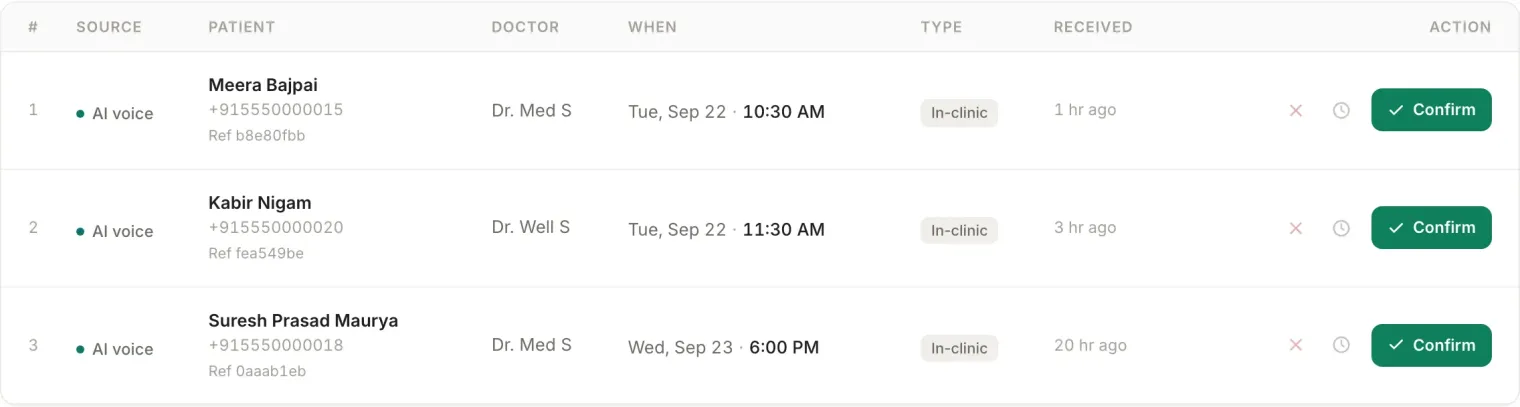
What you see on the screen
- Requests, Confirmed, This week, Missed, four tabs that answer the only questions a front desk asks
- Where each booking came from, AI voice, web chat, patient app or front desk, so you can filter by channel
- In-clinic or online, choose how the visit happens when you confirm it
- The Missed tab, everyone who called in the last seven days and did not book, with what happened and the call transcript
- A live queue for the day, now serving, in consult, waiting, and booked but not arrived
- Search and export, by name, phone or reference, and out to a spreadsheet or PDF
The AI never confirms an appointment. It captures the request with the day and time the patient asked for. A request holds nothing on the calendar until a doctor and a slot are picked and your staff confirm it.
The confirmation call
When you confirm, you can tick Call the patient to confirm. Your clinic line rings the patient with a short message: press 1 if you are coming, 2 for a call back, 9 to stop calls. It costs about 5 credits and only if they answer, and it only ever rings between 9 AM and 9 PM. The patient also gets the confirmation on WhatsApp.
Run the day from your phone
The Control via WhatsApp link at the top of the page connects your own number, so you can check and manage the day’s bookings by WhatsApp without opening the panel.
Questions doctors actually ask
Does the AI book appointments straight into my calendar?
No. It captures an appointment request with the patient’s name and the day and time they asked for, and puts it in your day-book. Your staff pick the doctor and slot and confirm it. The patient is never told a visit is confirmed until a person has confirmed it.
What is the Missed tab?
It lists everyone who called in the last seven days but did not end up with a booking, with how many times they tried, what happened on the call and the transcript. It is the list of patients a busy front desk would otherwise never hear about.
Can the patient confirm their own appointment?
Yes, by pressing 1 on the confirmation call your clinic line places when you tick Call the patient to confirm. Their answer shows against the appointment. The call costs about 5 credits and only when they answer.
Works with
The whole platform
One login, one patient record, every screen below. See them all explained.